


Cookpad recipes, homemade food
4.2118.00 Reviews
App Specs
- Version
- 26.35.0.1
- Updated On
- License
- Free
- Downloads
- 10,000,000+
- Developer
- Cookpad Inc.
- Categories
- Food & Drink
- Platform
- Android, iOS
Screenshots
 Analysis by AppCompare
I tend to trust a cooking app more when I can judge the recipes and the people behind them for myself, rather than being pushed toward a single “perfect” way to cook. That is the lens I bring to Cookpad: it is a recipe-sharing app from Cookpad Inc. where home cooks publish ideas and other cooks can respond. Its community is part of the appeal, but it also means I treat each recipe as advice from an individual, not as a tested guarantee. For a dish that needs exact timing or careful food handling, I read the whole method before I start and use my own judgment.
What trust looks like in a community cookbook
Cookpad has been around since Jan 14, 2011, and its current version is 26.8.0.1. It is free to install, with in-app purchases listed from $1.49 to $4.99 per item. The app has a 4.3 average from around 117,000 ratings and more than 10 million installs. Those figures suggest that many people have tried it, but they do not tell me whether a particular recipe is reliable, so I still look closely at its steps, ingredient amounts, and photos before committing dinner to it.
The Everyone content rating makes it suitable for a broad audience, though that is not the same as saying every recipe suits every household. I would still check ingredients carefully for allergies, dietary needs, or preferences. If I am cooking for someone else, I do not rely on a recipe title alone to determine what is in the finished dish.
Choices and care around participation
When an app includes recipe sharing and conversation, the important question for me is what I choose to contribute. I can use a recipe as a reference without making my own kitchen habits public; if I decide to post or comment, I keep personal details out of the text and focus on the food. That is a sensible approach for any community space, especially when a cooking story could casually mention family routines, locations, or other information that does not need to be shared.
I also separate the usefulness of a recipe from the popularity of its author. A lively discussion can help me spot practical clarifications, but a quiet recipe is not automatically poor, and a polished photo is not proof that the instructions will work in my kitchen. I look for a method that matches my equipment and skill level, then make small, reversible choices rather than changing several key ingredients at once.
Discovering New Recipes
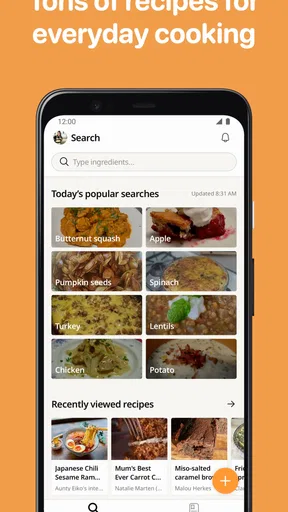
One of my favorite things about Cookpad is its vast collection of recipes. Seriously, it’s like having a culinary encyclopedia in your pocket. When I first opened the app, I was greeted with a treasure trove of delicious options. Whether you're in the mood for something classic or want to try a new twist on an old favorite, Cookpad has got you covered.
Easy Navigation and Search Features
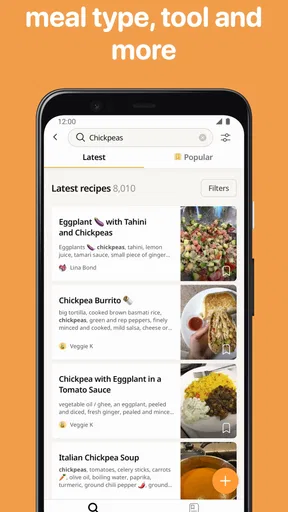
Navigating through the app is a breeze. The search function is incredibly intuitive, allowing you to find recipes based on ingredients, cuisine, or meal type. This is especially handy when you’re staring at a fridge full of random ingredients and wondering how on earth you're going to make dinner out of it. Just pop those items into the search bar and let Cookpad do the magic.
Worth Reading Before You Choose

Baby Panda World Brings Quick Play to Modern Phones, but Its Game Library Feels Busy

ESPN’s Live Game View Makes Following Close Games Easier

QuizzLand Review: A Good Fit for Short Trivia Breaks, Not Every Player

Basketball Stars: Multiplayer Is Fast, but Can It Recover When Matches Go Wrong?

WEBTOON Turns Phone Updates Into a Better Reading Routine

Link to Windows Runs on Shared Habits, Not Social Feeds
For a more dependable search, I start with the ingredient I most need to use up, then add a second ingredient only if the first results are too broad. That keeps me from filtering away useful ideas too early. I also skim the ingredient list before opening a recipe fully: it quickly shows whether the dish is built around pantry basics or depends on a specialty item I would have to buy.
Community Driven Content
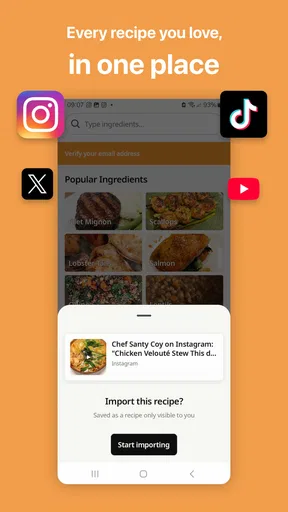
What sets Cookpad apart from other recipe apps is its vibrant community. Users from all over the world share their culinary creations, and it’s amazing to see the variety and creativity out there. I love the fact that you can connect with other food enthusiasts, leave comments, and even share your own recipes. It really feels like a supportive community where everyone is eager to help each other out.
That community focus is also the main difference from a conventional cookbook or a tightly edited recipe site. A cookbook gives me a curated route through a subject, while a large recipe site may prioritize professionally developed instructions. Cookpad is more like asking many home cooks how they make a dish. That variety is useful when I want a regional twist or a practical substitute, but it asks me to do more checking. If I need a highly standardized result for a special occasion, I would choose a source with tested recipes and a clear editorial process instead.
Finding a workable version of a dish
A useful way to browse is to compare a few recipes for the same meal rather than treating the first match as definitive. If several cooks use a similar sequence but differ on seasoning or cooking time, that gives me a starting point and highlights where personal taste enters. I pay special attention to whether the method explains visual cues—such as how browned or soft something should be—because those can be more helpful than a time alone when pans and stoves behave differently.
For example, if I have vegetables, eggs, and a little leftover rice on a weeknight, I can search around those ingredients and compare ideas before deciding what fits the amount I have. I check whether a recipe expects cooked or uncooked rice, then adjust the portion rather than blindly following a serving count. This is the kind of small reading habit that makes a broad community collection more practical and reduces the chance of discovering halfway through that I misunderstood the starting point.
Cooking Made Simple
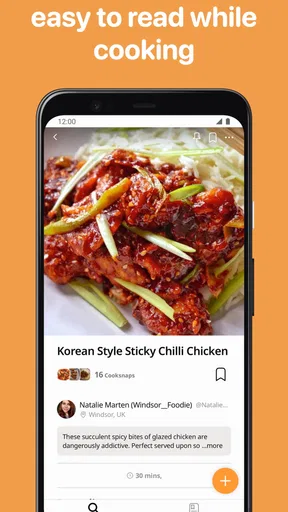
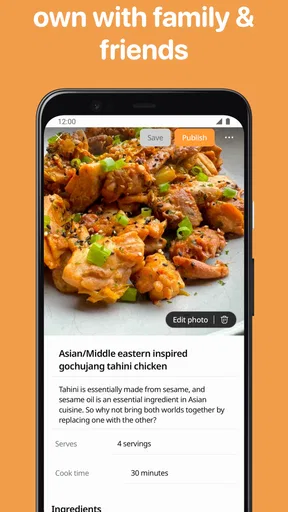
For those of us who might not be master chefs, Cookpad breaks down each recipe into simple, easy-to-follow steps. The instructions are clear, and the photos are a fantastic visual aid. I've tackled dishes I never thought I could make, all thanks to the detailed guides. Plus, the ability to save your favorite recipes and organize them into collections is a lifesaver for meal planning.
Turning saved recipes into a realistic plan
I find saved recipes most useful when I organize them around a real decision, not just a vague wish to cook better. A small collection for quick dinners, another for dishes that use up produce, and a third for meals I want to try on a free weekend can make browsing less distracting. Before shopping, I compare the saved recipes and look for ingredients that overlap; that helps me plan a few meals without buying a separate jar or bunch for every idea.
One limitation is that saving a recipe does not do the planning for me. I still need to check quantities, note what is already in the kitchen, and decide whether a recipe’s prep time suits the day I have. When I am short on time, I favor recipes with fewer steps and ingredients I know, rather than assuming that an appealing photo means the dish is quick.
Personal Touches
Another delightful feature is the ability to add personal notes to recipes. This means you can jot down any tweaks or adjustments you made, ensuring that your future attempts are even better. It’s like having a personalized cookbook that evolves with your culinary journey.
Those notes are especially valuable for details that are easy to forget but hard to infer later: the size of the pan I used, whether I reduced the salt, or what “done” looked like in my oven. I try to record one change at a time. If I alter the flour, liquid, and cooking time together, I will not know which adjustment improved the result, so a simple note can turn a lucky success into a repeatable one.
Interactive and Engaging
Cookpad isn't just about following recipes; it's about engagement. The app encourages interaction with features like cooking challenges and themed events. Participating in these challenges is a fun way to stretch your cooking skills and try new things. Plus, seeing what others come up with can be truly inspiring.
I would treat these activities as optional inspiration rather than a reason to cook something that does not fit my needs. A theme can help when I am stuck in a routine, but it should not override practical considerations like ingredients, time, or dietary restrictions. If I do share a result, a short description of what I changed is more useful to another cook than a photo without context.
Who will get the most from it
I think the app is a particularly good fit for people who cook at home often, enjoy adapting recipes, and do not mind comparing a few versions before choosing one. Beginners can use the step-by-step format and photos as a starting point, especially for familiar dishes where they can recognize whether a result looks right. More experienced cooks may get greater value from the range of home-style variations and ideas for using ingredients already on hand.
It is less suited to someone who wants every recipe professionally tested, tightly standardized, and presented with the same level of editorial oversight. It may also frustrate a cook who wants a fixed meal plan with little personal sorting, or someone who needs very specific nutrition or allergen assurances. In those cases, a specialized source with clear testing or dietary filters is a better first stop; Cookpad can still provide inspiration, but I would not make it the only authority.
Questions I ask before cooking
When I find a promising recipe, I check whether the measurements are clear, whether the method matches my tools, and whether the photos show the stages I need to recognize. If a step is vague, I read the discussion or comments for clarification before I begin. I also check that ingredients I plan to substitute will not change the structure of the dish—for instance, swapping a garnish is low risk, while replacing a main binding ingredient may not be.
For account and privacy choices, I take a cautious, practical approach: I review the choices the app presents when I use it and avoid posting details I would not want attached to a public cooking contribution. I do not assume that using a recipe requires sharing one, and I keep participation limited to what I actually want to do. That distinction matters to anyone who likes browsing a community but prefers to keep their own household routines private.
Overall, I see Cookpad as a flexible source of home-cooking ideas rather than a substitute for culinary judgment. Its free entry, broad user base, searchable recipes, and sharing culture make it easy to explore, while the open contribution model means quality can vary from one recipe to another. My best results come from reading first, comparing when the dish matters, and saving the versions I have personally tested. If that balance sounds appealing, it is worth trying; if you need a carefully standardized answer every time, I would start with a more curated cookbook or recipe service instead.
A cautious final recommendation
All in all, Cookpad is a fantastic tool for anyone who loves to cook or wants to start exploring the world of homemade food. It’s user-friendly, packed with features, and supported by a passionate community. Whether you're a beginner or a seasoned pro, there's something here for everyone. So go ahead, download the app, and let your kitchen adventures begin!
Pros
- User-friendly interface for easy navigation.
- Wide variety of global recipes available.
- Option to save favorite recipes for quick access.
- Active community for sharing and feedback.
- Step-by-step cooking instructions provided.
Cons
- Requires internet for most features.
- Some ads may interrupt the experience.
- Limited offline recipe access.
- No nutritional information for all recipes.
- Account needed to access full features.
FAQs for Cookpad recipes, homemade food
What is Cookpad and how does it work?
Cookpad is a community-driven recipe app that allows users to share and discover homemade recipes. It works by letting users upload their own recipes, complete with photos and detailed instructions. Other users can then try these recipes, leave feedback, and even share their own versions. It's a collaborative platform for cooking enthusiasts of all levels.
Is Cookpad free to use, and are there any in-app purchases?
Cookpad is free to download and use, offering a wide range of features at no cost. However, there is a premium version available that includes enhanced features such as advanced search filters and an ad-free experience. These premium options are available through in-app purchases, allowing users to choose based on their needs.
Can I use Cookpad offline?
Cookpad primarily requires an internet connection to browse and upload recipes. However, users can save their favorite recipes for offline access. This feature allows you to access your saved recipes without an internet connection, making it convenient for cooking in areas with limited connectivity.
How does Cookpad ensure the quality of the recipes?
Cookpad relies on its community to ensure the quality of recipes. Users can rate and review recipes, providing feedback that helps others determine which recipes are worth trying. Additionally, users often share photos of their cooking results, allowing you to gauge the quality and authenticity before attempting the recipe yourself.
Is Cookpad suitable for beginners in cooking?
Yes, Cookpad is suitable for cooks of all skill levels, including beginners. The app features a wide range of recipes from simple to complex, with detailed instructions and photos. Beginners can start with easy recipes and gradually try more challenging ones, learning new skills and techniques along the way.


